-->

whaust

2020年2月3日 星期一

print all Prime numbers in two integers Interval . (Python)

在兩個正整數之間印出所有質數。 (Python)

給定兩個正整數開始和結束。
任務是編寫一個Python程式印出兩個正整數間隔中的所有質數。


定義:

質數是大於1的自然數,除1及其本身外,沒有除數。
前幾個質數是{2、3、5、7、11…。}。

解決此問題的想法是使用for循環從頭到尾 迭代val,對於每個數字,如果它大於1,請檢查是否將n除盡。
如果找到其他除數,請打印該值。


Given two positive integer start and end. The task is to write a Python program to print all Prime numbers in an Interval.
Definition: A prime number is a natural number greater than 1 that has no positive divisors other than 1 and itself. The first few prime numbers are {2, 3, 5, 7, 11, ….}.
The idea to solve this problem is to iterate the val from start to end using a for loop and for every number, if it is greater than 1, check if it divides n. If we find any other number which divides, print that value.


# -*- coding: utf-8 -*-

t = 0

numberStart = int(input("Enter a Start number: "))

numberEnd = int(input("Enter a End number: "))

for val in range(numberStart, numberEnd + 1): 

   if val > 1: 

       for n in range(2, val): 

           if (val % n) == 0: 

               break

       else: 

           print(val)

           t = t + 1

print("There are " , t , " Primes"  )


2020年2月1日 星期六

[Class3] Python 環境搭建

Python  環境搭建

本章節我們將向大家介紹如何在本地搭建Python開發環境。
Python可應用於多平台包括Linux 和Mac OS X。
你可以通過終端窗口輸入"python" 命令來查看本地是否已經安裝Python以及Python的安裝版本。
  • Unix (Solaris, Linux, FreeBSD, AIX, HP/UX, SunOS, IRIX, 等等。)
  • Win 9x/NT/2000
  • Macintosh (Intel, PPC, 68K)
  • OS/2
  • DOS (多個DOS版本)
  • PalmOS
  • Nokia 移動手機
  • Windows CE
  • Acorn/RISC OS
  • BeOS
  • Amiga
  • VMS/OpenVMS
  • QNX
  • VxWorks
  • Psion
  • Python 同樣可以移植到Java 和.NET 虛擬機上。


Python下載

Python最新源碼,二進製文檔,新聞資訊等可以在Python的官網查看到:
Python官網:http://www.python.org/
你可以在以下鏈接中下載Python 的文檔,你可以下載HTML、PDF 和PostScript 等格式的文檔。
Python文檔下載地址:www.python.org/doc/


Python安裝

Python已經被移植在許多平台上(經過改動使它能夠工作在不同平台上)。
您需要下載適用於您使用平台的二進制代碼,然後安裝Python。
如果您平台的二進制代碼是不可用的,你需要使用C編譯器手動編譯源代碼。
編譯的源代碼,功能上有更多的選擇性, 為python安裝提供了更多的靈活性。
以下為不同平台上安裝Python的方法:

Unix & Linux 平台安裝Python:

以下為在Unix & Linux 平台上安裝Python 的簡單步驟:
  • 打開WEB瀏覽器訪問http://www.python.org/download/
  • 選擇適用於Unix/Linux的源碼壓縮包。
  • 下載及解壓壓縮包。
  • 如果你需要自定義一些選項修改Modules/Setup
  • 執行  ./configure腳本
  • make
  • make install
執行以上操作後,Python會安裝在/usr/local/bin 目錄中,Python庫安裝在/usr/local/lib/pythonXX,XX為你使用的Python的版本號。

Window 平台安裝Python:

以下為在Window 平台上安裝Python 的簡單步驟:
  • 打開WEB瀏覽器訪問http://www.python.org/download/
  • 在下載列表中選擇Window平台安裝包,包格式為:python-XYZ.msi  文件, XYZ為你要安裝的版本號。
  • 要使用安裝程序  python-XYZ.msi , Windows系統必須支持Microsoft Installer 2.0搭配使用。只要保存安裝文件到本地計算機,然後運行它,看看你的機器支持MSI。Windows XP和更高版本已經有MSI,很多老機器也可以安裝MSI。
  • 下載後,雙擊下載包,進入Python安裝嚮導,安裝非常簡單,你只需要使用默認的設置一直點擊"下一步"直到安裝完成即可。

MAC 平台安裝Python:

最近的Macs系統都自帶有Python環境,你也可以在鏈接 http://www.python.org/download/ 上下載最新版安裝。


環境變量配置

程序和可執行文件可以在許多目錄,而這些路徑很可能不在操作系統提供可執行文件的搜索路徑中。
path(路徑)存儲在環境變量中,這是由操作系統維護的一個命名的字符串。這些變量包含可用的命令行解釋器和其他程序的信息。
Unix或Windows中路徑變量為PATH(UNIX區分大小寫,Windows不區分大小寫)。
在Mac OS中,安裝程序過程中改變了python的安裝路徑。如果你需要在其他目錄引用Python,你必須在path中添加Python目錄。

在Unix/Linux 設置環境變量

  • 在csh shell:  輸入 
    setenv PATH "$PATH:/usr/local/bin/python"
    , 按下"Enter"。
  • 在bash shell (Linux):  輸入 
    export PATH="$PATH:/usr/local/bin/python"
    ,按下"Enter"。
  • 在sh或者ksh shell:  輸入 
    PATH="$PATH:/usr/local/bin/python"
    , 按下"Enter"。
注意:  /usr/local/bin/python是Python的安裝目錄。

在Windows 設置環境變量

在環境變量中添加Python目錄:
在命令提示框中(cmd) :  輸入 
path=%path%;C:\Python
按下"Enter"。

注意:  C:\Python是Python的安裝目錄。
也可以通過以下方式設置:
  • 右鍵點擊"計算機",然後點擊"屬性"
  • 然後點擊"高級系統設置"
  • 選擇"系統變量"窗口下面的"Path",雙擊即可!

  • 然後在"Path"行,添加python安裝路徑即可(我的D:\Python32),所以在後面,添加該路徑即可。 ps:記住,路徑直接用分號";"隔開!
  • 最後設置成功以後,在cmd命令行,輸入命令"python",就可以有相關顯示。

Python 環境變量

下面幾個重要的環境變量,它應用於Python:
變量名描述
PYTHONPATHPYTHONPATH是Python搜索路徑,默認我們import的模塊都會從PYTHONPATH裡面尋找。
PYTHONSTARTUPPython啟動後,先尋找PYTHONSTARTUP環境變量,然後執行此文件中變量指定的執行代碼。
PYTHONCASEOK加入PYTHONCASEOK的環境變量, 就會使python導入模塊的時候不區分大小寫.
PYTHONHOME另一種模塊搜索路徑。它通常內嵌於的PYTHONSTARTUP或PYTHONPATH目錄中,使得兩個模塊庫更容易切換。


運行Python

有三種方式可以運行Python:

1、交互式解釋器:

你可以通過命令行窗口進入python並開在交互式解釋器中開始編寫Python代碼。
你可以在Unix,DOS或任何其他提供了命令行或者shell的系統進行python編碼工作。
$ python # Unix/Linux 

或者 

C:>python # Windows/DOS
以下為Python命令行參數:
選項描述
-d在解析時顯示調試信息
-O生成優化代碼( .pyo 文件 )
-S啟動時不引入查找Python路徑的位置
-V輸出Python版本號
-X從1.6版本之後基於內建的異常(僅僅用於字符串)已過時。
-c cmd執行Python 腳本,並將運行結果作為cmd 字符串。
file在給定的python文件執行python腳本。

2、命令行腳本

在你的應用程序中通過引入解釋器可以在命令行中執行Python腳本,如下所示:
$ python script.py # Unix/Linux 

或者 

C:>python script.py # Windows/DOS
注意:在執行腳本時,請檢查腳本是否有可執行權限。

3、整合式開發環境(IDE:Integrated Development Environment): PyCharm

PyCharm 是由JetBrains 打造的一款Python IDE,支持macOS、 Windows、 Linux 系統。
PyCharm 功能: 調試、語法高亮、Project管理、代碼跳轉、智能提示、自動完成、單元測試、版本控制……
PyCharm 下載地址: https://www.jetbrains.com/pycharm/download/
繼續下一章之前,請確保您的環境已搭建成功。如果你不能夠建立正確的環境,那麼你就可以從您的系統管理員的幫助。
在以後的章節中給出的例子已在Python2.7.6 版本測試通過。

2020年1月19日 星期日

Impact of Food Traders Cut corners on Public Health and Food Safety

Enzo / Food Safety Specialist in Japan, Long-term focus on food safety in Asia

Motivation

Nowadays, most people have the habit of eating out because of work and school. However, in recent years, food safety problems have emerged endlessly, such as tincture oil, melamine milk powder, toxic starch, plasticizers, and the fenponi "poison egg" that broke out this year And other major food safety incidents have made consumers worry about whether the food they eat is really safe. From the above incidents, it can be seen that Taiwan still has many deficiencies in food safety management. The most dissatisfied society is that judges will judge whether they violate the "Food Safety Law" based on "whether it is harmful to human health." There are cases of "seeing, but not punishing".


An Economic Perspective of Business Cut-offs

   Businessmen are very valuable from an economic point of view. Every step from raw material transportation to food processing to final sales requires costs. Factors that affect costs include the balance of supply and demand in the market and the reasonable profit of food sales. Under the good market mechanism, traders can use reasonable raw materials for processing. What happens if the market supply and demand do not reach a balance today? The price of goods in the sales market is already lower than the cost of the original raw materials and the processing and value-added activities of the merchant. Forcing businessmen to not reduce the cost of raw materials, in order to make money, they will choose things with lower processing costs to process, and then make profits between them, but the use of such "low-cost processed products" may cause human health to be affected , So people have been nicknamed the "black-hearted businessman".


From a legal point of view, the businessman cut corners

    The government has established laws to establish relevant standards, such as food processing standards, food additive standards, and food marketing and labeling standards. Merchants can sell inferior goods by category, or sell food that is about to expire. For example, tofu in miso soup, you can use poorly sold tofu instead of beautifully packaged tofu. This selection can indeed reduce production costs, or improve the processing method. If the merchants all meet the above standards, and the government agencies have actual law enforcement, such as auditing and enforcement, this will increase the public's trust in food and the government . So the merchant did not meet the relevant standards and the method of reducing costs was improper? For example, the contents of sales products are not clearly marked, things that should not be added, inappropriate methods, such as using industrial catalysts to accelerate production time However, it may cause harm to health, or change the shelf life at will. These improper methods will cause bad foods, and then leave the human body in an unhealthy state.


Conclusion

    From the above two perspectives, similar conclusions can be drawn: everything that a businessman does costs, because of market factors, reducing production costs. If a reasonable and legal processing method is selected and the government has conducted a rigorous review, people will have a sense of trust; if an unreasonable processing method is used, it may affect human health. This is a virtuous circle and a vicious circle. I prefer a virtuous circle. In this era of food for all, in order to eat at ease, the cooperation of consumers, businessmen, and the government is required to minimize the impact of food safety issues.

食品商人偷工減料的對民眾健康及食品安全的影響

Enzo / 旅日食品安全專家,長期關注亞洲地區食品安全


動機

現今大多數人因為工作、上學的關係而有在外用餐的習慣,但是近年來食安問題層出不窮,如餿水油、三聚氰胺奶粉、毒澱粉、塑化劑,到今年爆發的芬普尼「毒蛋」等重大食安事件,讓消費者擔心吃下肚的食物是否真的安全。從上述的幾項事件可看出台灣在食安管理上仍有許多不足的地方,而最讓社會不滿的是法官會依據「是否危害人體健康」來判斷是否觸犯《食安法》,因此常有「看得到,罰不到」的情形發生。


以經濟的角度看商人偷工減料的行為

   商人在經濟角度中,是相當有價值的,從原料運送,到食品加工,至最後的銷售,每一個步驟都需要成本。影響成本的因素有市場的供需平衡、和食品銷售的合理利潤。在良好的市場機制下,商人得以用合理的原物料進行加工。     要是今天市場供需沒有達到平衡會發生什麼事情?在銷售市場的商品價格,已經比原先原物料的成本、和商人加工,做加值這個動作的成本還要低了。迫使商人在不能降低原物料成本,為了要賺錢,會選擇加工成本更低的東西來進行加工,進而賺取之間的利潤,但利用這樣的”低成本加工物”可能會導致人體健康受到影響,因而被人們冠上「黑心商人」的臭名。

以法律的角度看商人偷工減料的行為

    政府訂定法律來建立相關的標準,譬如說食品加工的標準、食品添加物標準及食品標售、標示的標準。商人可以將次等商品進行分類銷售,或即將到期的食物進行分類銷售。比方說味噌湯裡面的豆腐,在選擇上面可以使用賣相較差的豆腐,來取代精美包裝的豆腐。這樣選用可以確實降低生產成本,亦或是加工方法改良商品商人如果都有符合以上的標準,且政府機關有確實執法,像是稽核、執行,如此一來會使民眾對食品和政府加深信賴感。     那麼商人沒有達到相關的標準且降低成本的方法不當呢?譬如說銷售商品內容標示得不清不楚、添加不該添加的東西、用不當的工法,像是使用工業用觸媒加速生產時間,卻對健康造成傷害、又或著隨意更改保存期限,這些不當的方式會導致不良食品的造成,進而使人體處於非健康狀態。

結論

    從上面的兩個角度中,可以得到相似的結論 : 商人做的每件事情都需要成本,因為市場因素,而降低了生產成本。如果選用合理、合法的加工方式,且政府有確實審核,會使人民產生信賴感;如果使用不合理的加工方式,可能會影響人體的健康。這分別是良性與惡性循環,我偏向的是良性循環。在這人人外食的時代下,為了吃得安心,需要消費者、商人、及政府三者共同合作,才能使食品安全的問題所造成的影響減至最小。  

2019年12月29日 星期日

Java Boolean Operator

Operator
Description
Example
== (equal to)
Checks if the values of two operands are equal or not, if yes then condition becomes true.
(A == B) is not true.
!= (not equal to)
Checks if the values of two operands are equal or not, if values are not equal then condition becomes true.
(A != B) is true.
> (greater than)
Checks if the value of left operand is greater than the value of right operand, if yes then condition becomes true.
(A > B) is not true.
< (less than)
Checks if the value of left operand is less than the value of right operand, if yes then condition becomes true.
(A < B) is true.
>= (greater than or equal to)
Checks if the value of left operand is greater than or equal to the value of right operand, if yes then condition becomes true.
(A >= B) is not true.
<= (less than or equal to)
Checks if the value of left operand is less than or equal to the value of right operand, if yes then condition becomes true.
(A <= B) is true.
&& (logical and)
Called Logical AND operator. If both the operands are non-zero, then the condition becomes true.
(A && B) is false
|| (logical or)
Called Logical OR Operator. If any of the two operands are non-zero, then the condition becomes true.
(A || B) is true
! (logical not)
Called Logical NOT Operator. Use to reverses the logical state of its operand. If a condition is true then Logical NOT operator will make false.
!(A && B) is true

2019年12月26日 星期四

駱駝式命名法

駱駝式命名法就是當變量名或函數名是由一個或多個單詞連結在一起,而構成的唯一識別字時,第一個單詞以小寫字母開始;從第二個單詞開始以後的每個單詞的首字母都採用大寫字母,例如:myFirstName、myLastName,這樣的變量名看上去就像駱駝峰一樣此起彼伏,故得名。
駱駝式命名法(Camel-Case)一詞來自Perl 語言中普遍使用的大小寫混合格式,而Larry Wall 等人所著的暢銷書《Programming Perl》(O'Reilly 出版)的封面圖片正是一匹駱駝。
駱駝式命名法的命名規則可視為一種慣例,並無絕對與強制,為的是增加識別和可讀性。

小駝峰法

變量一般用小駝峰法標識。駝峰法的意思是:除第一個單詞之外,其他單詞首字母大寫。譬如
int myStudentCount;
變量myStudentCount第一個單詞是全部小寫,後面的單詞首字母大寫。
常用於函數名。

大駝峰法

相比小駝峰法,大駝峰法(即帕斯卡命名法)把第一個單詞的首字母也大寫了。常用於類名,屬性,命名空間等。譬如
public class DataBaseUser;

2019年12月25日 星期三

Windows Server 2008 更細緻的密碼原則 (Windows Server 2008 Fine-Grained Password Policy)

前言
在以往Windows Server 2003以前的Active Directory網域中,只允許針對網域等級設定單一密碼原則與鎖定原則,亦即網域內的所有使用者均必須遵循並使用相同的原則,這似乎不夠彈性,因此Windows Server 2008的Active Directory網域環境提供了一個更細緻的密碼原則
(Fine-Grained Password Policies)功能,允許讓管理人員針對網域內的不同使用者或群組設定不一樣的密碼原則與鎖定原則。
細緻的密碼原則使用二個新的物件類別來存放在原則設定:
■     密碼設定容區(Password Settings Container;PSC)
密碼設定容器(Password Settings Container,PSC)』物件類別預設會建立在網域的『SYSTEM』容區底下,此容區用以儲存網域的密碼設定物件 (PSO),你並無法重新命名、移動或刪除這個容器。
■     密碼設定物件(Password Settings objects;PSO)
PSO提供所有密碼原與鎖定原則的內容屬性,包括了密碼最短使用期限、密碼最長使用期限、最短密碼長度、帳戶鎖定閾值……等,此外,它還包括了一個多值連結屬性(Multivalued link attribute)可將此PSO連結套用至使用者或群組,並且還有一個整數型類的優先值(precedence value)用以解決特定使用者或群組一旦被連結至多個PSO時所產生的衝突狀況。
設定細緻化的密碼原則
使用這項新的細緻化密碼原則功能,先決條件為您須要擁有網域管理人員的權限而且網域功能等級為Windows Server 2008以上。
首先,您必需使用ADSI編輯器創造並設定PSO。
1.      從系統管理工具功能表內開啟「ADSI編輯器(Adsiedit.msc)」。
2.      以滑鼠右鍵點選【ADSI編輯器】並選擇【連線到】。
3.      假若連線設定對話方塊上出現【預設命名內容】和網域名稱則直接按【確定】接受預設值。
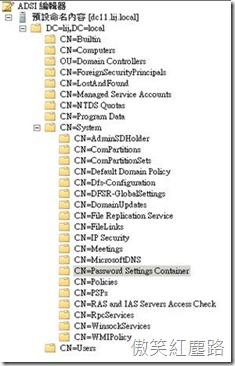
4.      接下來,擴展網域名稱下的CN=System 這個容區,並往下找到CN=Password Settings Container物件,(亦即點選點至如下的路徑:DC=xx, DC=xx, CN=System, CN=Password Settings Container),並在於Password Setting Container上點選右鍵 ,選取【新增物件】,這將啟動精靈程式讓您開始設定PSO。
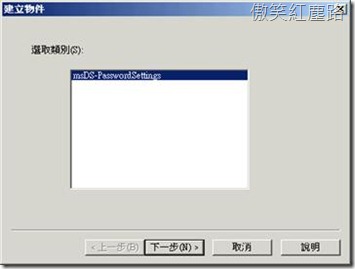
5.      首先在【建立物件】對話方塊,msDS-PasswordSettings為唯一可選用的類別,故直接按【下一步】繼續。
6.      接下來的共用名稱(Common Name;cn)屬性中請輸入一個日後容易辨別的名稱。
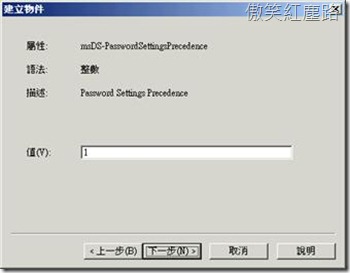
7.      接下來的msDS-PasswordSettingsPrecedence (Password Settings Precedence)屬性中輸入一個大於等於1的值,這個值為PSO的優先權,值越低,優先權越高,如果一個使用者所隸屬的二個群組被連結至不同的PSO,一個連結的PSO優先值為5,另一個優先權為3,則優先權3的PSO將會覆蓋過優先值為5的PSO。
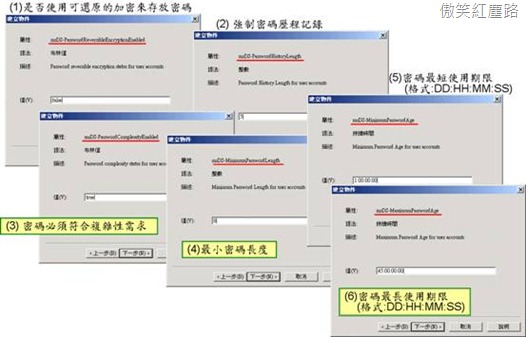
8.      接下來的精靈程式將開始設定密碼原則和鎖定原則的各種屬性,需要設定的屬性名稱和說明如下表所示:

屬性名稱
說明
格式與範例
msDS-PasswordReversibleEncryptionEnabled
是否使用可還原的加密來存放密碼
FALSE / TRUE  (建議: FALSE)
msDS-PasswordHistoryLength
強制密碼歷程記錄
0 ~ 1024
msDS-PasswordComplexityEnabled
密碼必須符合複雜性需求
FALSE / TRUE (建議: TRUE)
msDS-MinimumPasswordLength
最小密碼長度
0~255,建議7以上
msDS-MinimumPasswordAge
密碼最短使用期限
dd:hh:mm:ss,例如 1:00:00:00 (一天)
msDS-MaximumPasswordAge
密碼最長使用期限
dd:hh:mm:ss,例如 45:00:00:00 (45天)
msDS-LockoutThreshold
帳戶鎖定閾值
0~ 65535
msDS-LockoutObservationWindow
重設帳戶鎖定計數器的時間
dd:hh:mm:ss,例如 00:01:00:00 (1小時)
msDS-LockoutDuration
帳戶鎖定期間
dd:hh:mm:ss,例如 00:01:30:00 (90分鐘)
若設00:00:00:00 則代,表永久鎖定直到管理員解除
下圖為密碼原則設定畫面
下圖為鎖定原則設定:

輸入屬性值時須要符合資料類型、格式與範圍,否則會出現如下圖的錯誤對話方塊。
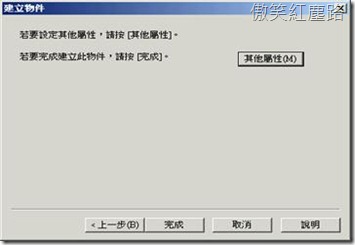
9.      輸入一連串屬性後,請在精靈的最後一個畫面中,請按【完成】新增此PSO。
10.  接下來,請點選剛剛所建立好的物件按下右鍵功表的內容選項,以便可以設定最重要的一項屬性:msDS-PSOAppliesTo來將此PSO的密碼原則設定套用在特定的使用者或群組,所以請在內容對話方塊內編輯『msDS-PSOAppliesTo』這個屬性,並按【新增Windows帳戶】來新增想要應用這個PSO的使用者或群組。
PSO的應用優先順序問題
在大型網路環境下,使用者或群組物件可以連結到多個 PSO,因為使用者可能隸同時屬於多個群組 (而每個群組都被套用不同的 PSO),或多個 PSO 被直接套用至使用者或群組物件。但是只有唯一的一個 PSO 才能套用成為有效的密碼原則,亦即只有該 PSO 的設定才能影響使用者或群組,您並無法使用任何方式來合併多個 PSO 連結到使用者或群組的設定。
每個 PSO 都具有名為 msDS-PasswordSettingsPrecedence 的額外屬性,此屬性設計用來決定多個PSO間的使用優先權。msDS-PasswordSettingsPrecedence 屬性具有 1 以上的整數值,較小的 msDS-PasswordSettingsPrecedence 屬性值表示該 PSO 具有比其他 PSO 高的等級,或說具有較高的優先順序。例如,假設某使用者物件具有兩個連結的 PSO,其中一個 PSO 的 msDS-PasswordSettingsPrecedence 值為 10,另一個 PSO 的 msDS-PasswordSettingsPrecedence 值為20,則在這個案例中,msDS-PasswordSettingsPrecedence 值為 10 的 PSO 會具有較高的等級,因此它將會套用至物件,但如果有二個PSO的值相同,則需比較ObjectGUID,第一部份最右側的位元組,較小優先權較高。例如:下例中前者PSO將優先。
3642912-87cd-4672-ab8e-bd1e8496616b
7b33c54e-a075-5a4d-869d-0b0e2455de61
綜合而論,如果有多個 PSO 連結至使用者或群組,決定要套用之結果 PSO 的方式如下:
1.      直接連結至使用者物件的 PSO 會成為結果 PSO,如果有多個PSO連結至使用者物件,則msDS-PasswordSettingsPrecedence 值最低者套用。
2.      如果沒有任何 PSO 直接連結到使用者物件,則會比較使用者所隸屬的全域安全性群組是否有被連結到PSO,然後,具有最低 msDS-PasswordSettingsPrecedence 值的 PSO 將會是結果 PSO。
3.      如果上述方式無法取得任何 PSO,則會套用預設網域密碼原則。
總之,PSO的應用優先順序為直接連接到使用者物件最為優先,次為連結到隸屬群組的PSO,最後才是應用預設的網域密碼原則。


Popular